Build with AI. Audit in Excel.

Turn your Excel files into web apps
Convert an Excel file or a Google Sheets model into a secure web application. Describe it to the App Builder, upload a model you already use, or build it yourself in Excel. Either way the logic stays as spreadsheet formulas, so ordinary Excel skills are enough to check the numbers.
14 days free · 200 free credits · No credit card
From 99 EUR per app per month. Unlimited users, never per seat.

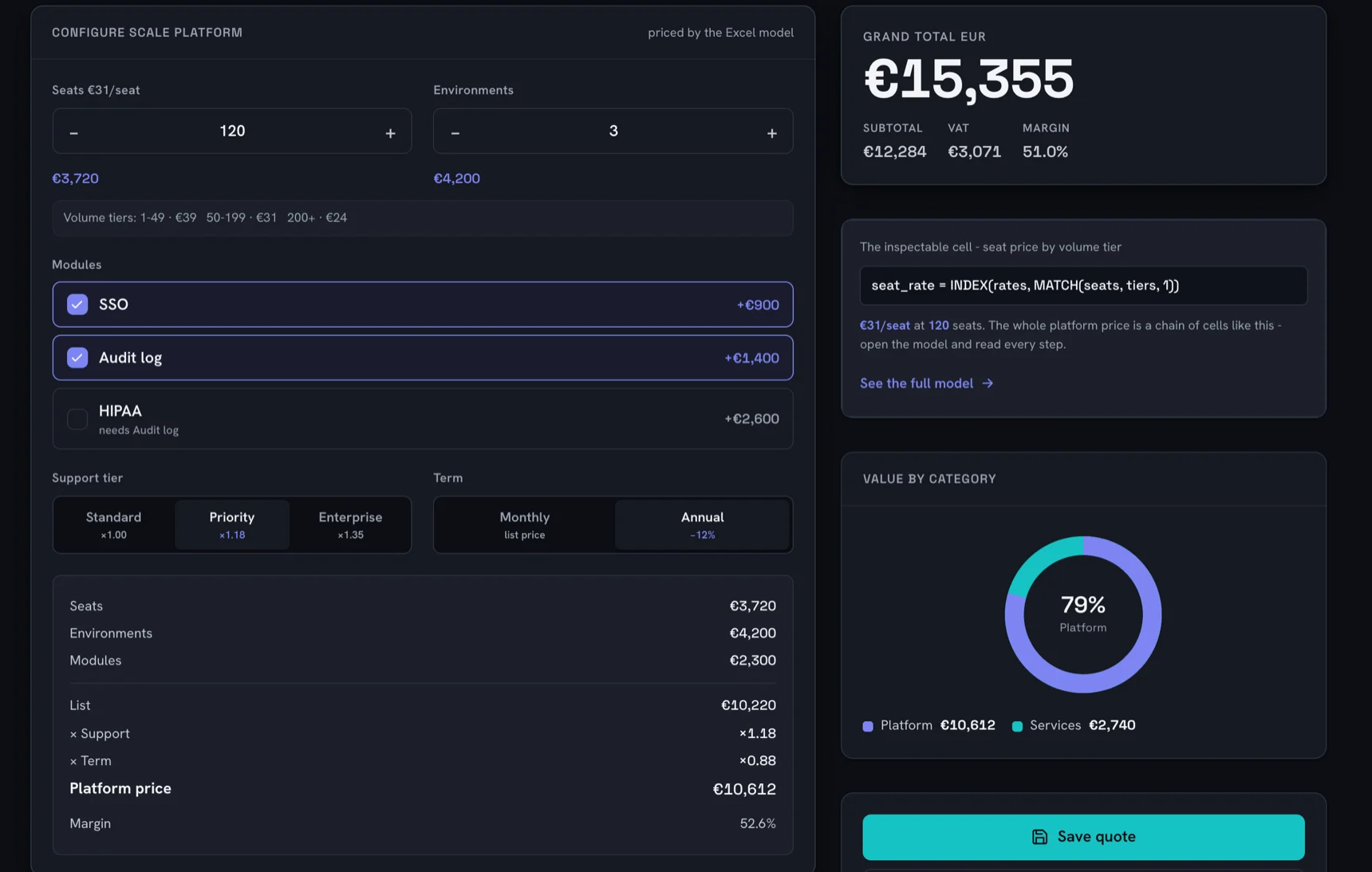
The Quote Studio demo app in dark mode: a configurator with seats, environments, modules, support tier and term, a grand total of EUR 15,355, and the app's inspectable cell panel showing the Excel formula seat_rate = INDEX(rates, MATCH(seats, tiers, 1)), EUR 31 per seat at 120 seats

XThe model behind it, open in Excel
seat_ratefx=INDEX(rates, MATCH(seats, tiers, 1))
A B
1 tiers rates
2 1 €39
3 50 €31
4 200 €24
5 seats 120
seats = 120, so MATCH lands on 50

Trusted by teams at
VattenfallOffice ManagementTelia CompanyIf SkadeförsäkringarAmazon Prime VideoFocus NeoHertzIndigrowVattenfallOffice ManagementTelia CompanyIf SkadeförsäkringarAmazon Prime VideoFocus NeoHertzIndigrow
Molnify is an Excel and Google Sheets app-building platform that converts spreadsheet models into browser-based web applications. Build with AI or build directly in Excel, and keep the spreadsheet as the editable source of truth.

Your model stays a spreadsheet the whole way through. Whichever way you start, your formulas carry over intact; what differs is who marks up the app layer, the App Builder or you, on a separate sheet if you prefer, so the sheets your team works in every day stay exactly as they are.

AI app builder for real business applications

Built by AI. Verifiable by anyone who knows a little Excel.

Describe the app you need, or upload the Excel model your business already runs on. Molnify’s App Builder turns it into a real web application, and keeps the calculations and business logic in a spreadsheet you can open, understand and change.

From Excel to a real web app

Molnify has been turning Excel and Google Sheets models into secure, multi-user web applications for ten years. Instead of sharing a spreadsheet, your users get a professional application that works in any browser, on any device. The spreadsheet defines how the app is built, and can be uploaded again whenever you want to update the app for everyone using it.

Molnify supports 200+ Excel functions, but the platform goes far beyond spreadsheet calculations. Apps can use databases and SQL, external APIs, PDF generation, authentication, email, SMS, Slack and Teams actions, AI, file uploads, JavaScript, HTML and CSS, and combine them all in the same application.

That means anything from an ROI calculator to a CPQ application, and quite a lot that does not look like a spreadsheet at all. Or your own version of =DOOM().

Now AI can build it for you

With the App Builder, you simply chat with the AI and watch your application take shape in the live preview. Ask for changes, test the result and publish when you’re ready.

You can start from scratch by describing what you want, or upload an Excel file you already trust. When you bring your own model, the App Builder keeps your existing calculations intact and builds the application around them.

The same Molnify expertise is also available as an open App Builder Skill for AI coding agents such as Claude Code and Codex.

Before it goes live

You also choose which AI does the work. Claude, Gemini, GLM and Kimi all build working apps, and all but Claude run inside the EU, so if you pick one of those three, your description and the spreadsheet stay inside it.

Nothing reaches your users until you press Publish. Once it is live, the app runs on a Molnify subscription priced per app with unlimited users, exactly like an app you built by hand.

What you can check afterwards

Wherever possible, the calculations and core business rules end up as ordinary Excel formulas. So when your app sets a net price, applies a discount or decides whether a customer qualifies for something, you can open the file, find the cell and follow it. Change it in Excel and upload again, or ask the App Builder to fix it. What that looks like when someone questions a number is the next thing this page shows you.

Build with AI. Audit in Excel.

The Molnify robot mascot holding up an Excel file

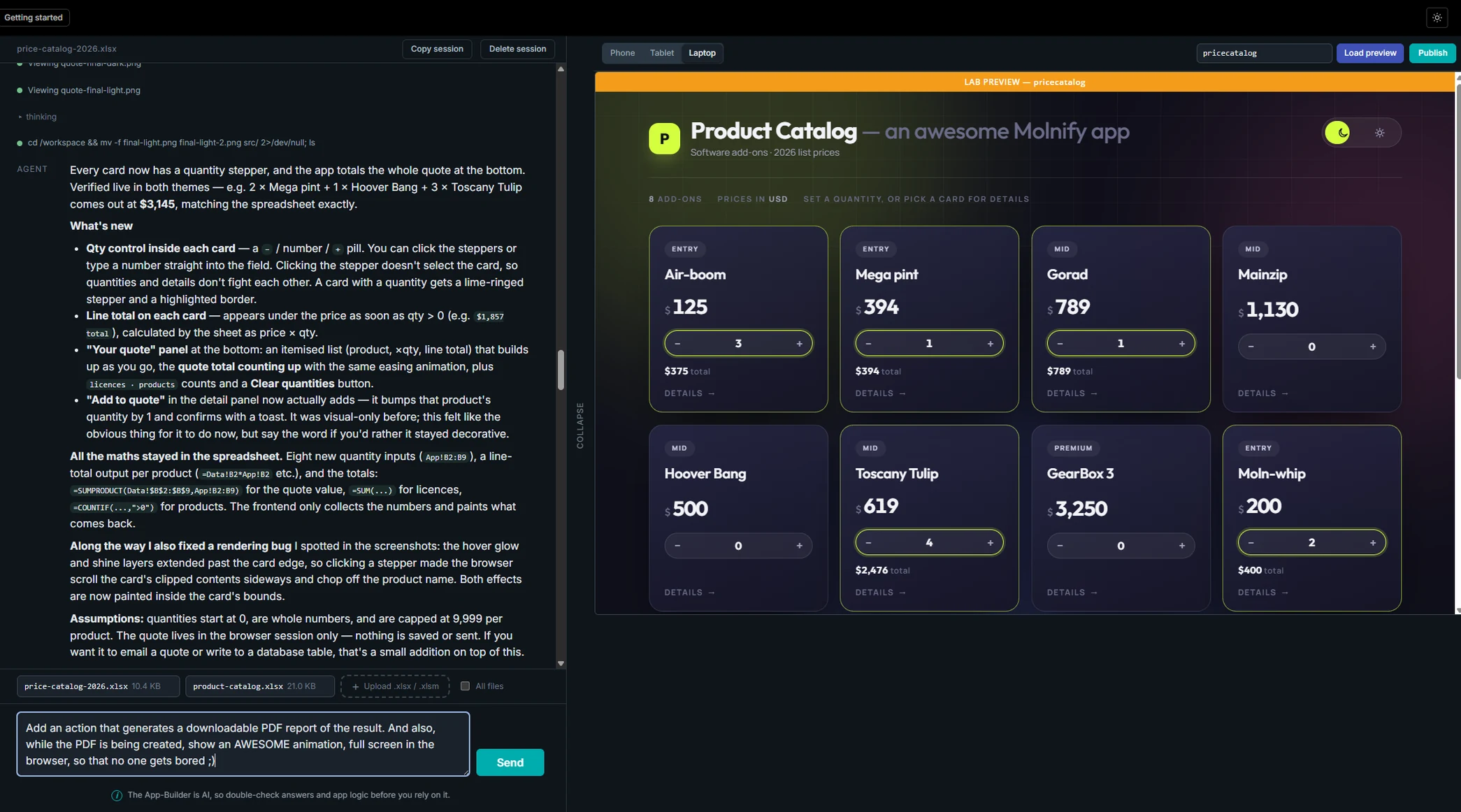
The Molnify App Builder with a chat on the left describing the app it built, listing the spreadsheet formulas it used, and a live preview of the finished product catalogue web application on the right

A real session in the Molnify App Builder. Nothing here is a mock-up: the reply, the formulas and the running application are the product as it works today.

Try it yourself

Two live apps, one click away

These are not videos or mock-ups. Quote Studio and Meridian are real, running Molnify apps, open to anyone: click either picture to use one in a new tab. Then do the part that matters. Download the Excel file from inside the running app, open it, and read the formulas that produced every number you just saw. That is the whole claim on this page, and you can test it in about two minutes without an account.

Quote Studio

A quoting tool for a sales team. Build a quote line by line, save it, and download the Excel model that does the maths from inside the app.

The Quote Studio demo app: seat and environment steppers, SSO and Audit log modules, support tier and term choices, a price build-up ending in a platform price of EUR 10,612 at 52.6 per cent margin, and a grand total of EUR 15,355 next to the inspectable seat_rate formula cell Open Quote Studio in a new tab →

Meridian

A finance dashboard for a CFO: revenue, EBITDA and cash flow from a driver model you can change, with an AI-written executive report.

The Meridian finance demo app: revenue of 102,714 up 8.1 per cent, EBITDA 20,004 at a 19.5 per cent margin, net income 10,466, free cash flow 7,642 and net debt to EBITDA of 0.87x, above an EBITDA bridge chart and revenue, EBITDA and margin charts Open Meridian in a new tab →

Have a spreadsheet you want to see as an app? Upload it to the App Builder and describe what it should look like.

Start 14-day free trial

The difference

Where the maths ends up

Your app quotes a customer $4,434. Can you show them how it got there?

Most AI builders answer a prompt by writing code. The maths that decides your price, your premium or your forecast ends up in program code, and checking it means reading that code. If nobody on the team can, the only way to check the result is to trust it.

Molnify moves the bar to where your team already stands. The logic stays as spreadsheet formulas, so the person who has to answer for the number can open the file and follow it themselves. The bar is Excel, and most finance and operations teams already clear it.

This is vibe coding without the black box. It is not an argument against AI, it is an argument for being able to check the parts that matter.

Same AI, two outcomes

Molnify An AI code builder
The logic arrives as Spreadsheet formulas Program code
To check a number you Open the cell Read the code
To change a rate you Change the cell and upload the file Edit the code or prompt again

Same models, same prompt, different thing to hand your auditor. And the file is the difference: real Excel formulas, 200+ functions, with the JavaScript, CSS, SQL and actions that power the app living in the same file, read as the build instruction. An AI that builds, a file anyone can audit, models inside the EU, one price for any crowd. Each exists somewhere else. The combination does not.
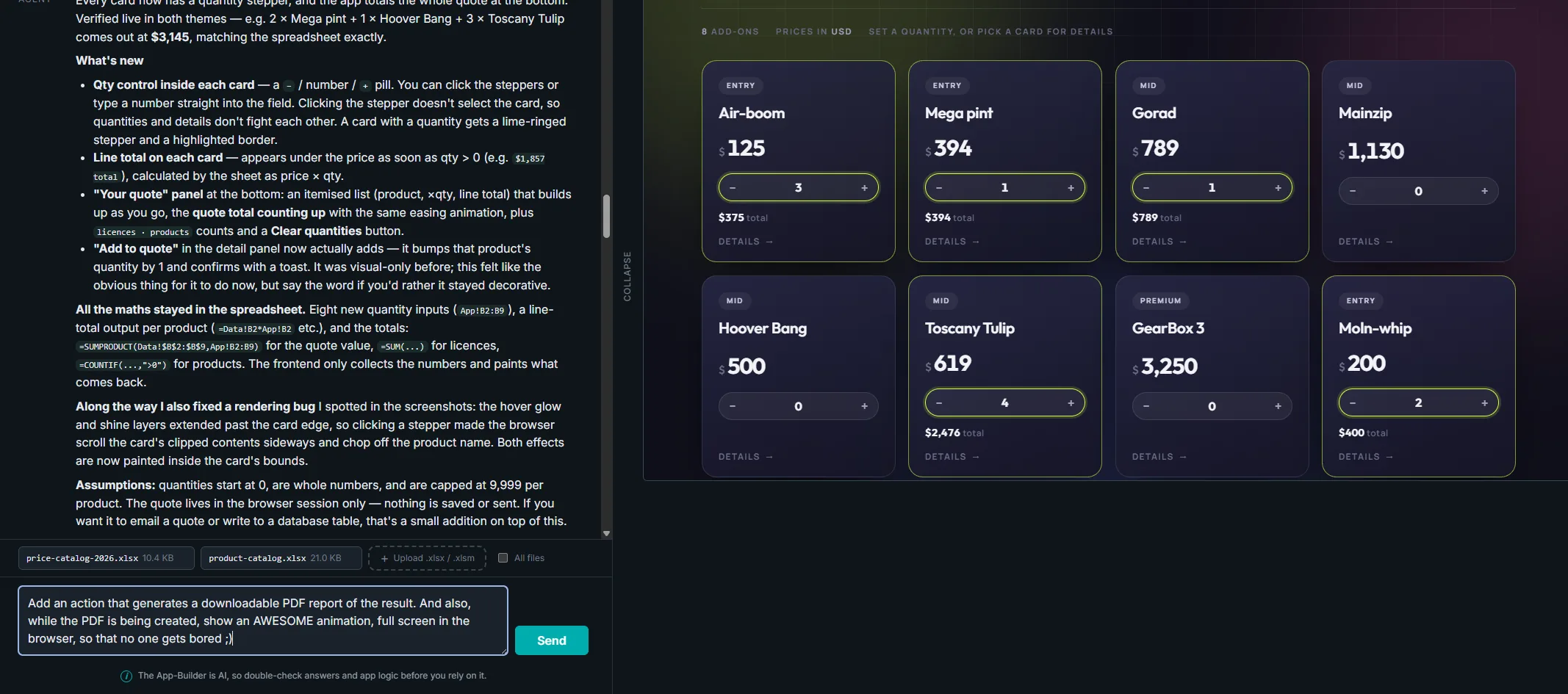
A real Molnify App Builder session: the reply explains that all the maths stayed in the spreadsheet, with SUMPRODUCT for the quote value, SUM for licences and COUNTIF for products, next to the live Product Catalog preview where Toscany Tulip is at 4 for $2,476 and Moln-whip at 2 for $400, above the user’s next prompt asking for a PDF report
Xpricecatalog.xlsx, the sheet behind the session
B45fx=SUMPRODUCT(Data!$B$2:$B$9, App!B2:B9)
$4,434Quote total
Trace it through the cells
App!B14Air-boom, 3 at $125375
App!B18Mega pint, 1 at $394394
App!B22Gorad, 1 at $789789
App!B34Toscany Tulip, 4 at $6192,476
App!B42Moln-whip, 2 at $200400
App!B26, B30, B38Mainzip, Hoover Bang and GearBox 3, all at zero0
375 + 394 + 789 + 2,476 + 4004,434

In a Molnify app the answer is still a cell. Open the file, read the formula, show your work. The catalogue in the session is live: open Product Catalog and press the same numbers yourself.

The trade

Keep everything that made Excel great. Lose everything that did not.

Excel became the world’s favourite business tool because anyone can build almost anything with it. The problems only start when the file has to be shared. Turning the file into an app keeps the first part and removes the second.

What you keep

  • The model you already trust. Your formulas run the app unchanged, cell for cell.
  • The speed. Dramatically faster than traditional development: in many cases an idea in the morning becomes a working app the same day.
  • The skill you already have. If you can build it in Excel, you can run it as a web app.
  • The file itself. Download it any day, read every calculation, change it, upload it again.
  • The owner. The colleague who understands the problem keeps control of the model. It never moves into a developer queue.

What you lose

  • Excel version chaos. There is one version: the app. Nobody quotes from last month’s file again.
  • The forwarded file. Your users get the interface you designed, never the file with every rate and assumption in it.
  • Missed price updates. Change the model once and every user is on the new version the same second. No reinstall, no app store.
  • Formula overwrites. Nobody types over a formula and spends Friday debugging it with whoever built the file.
  • Fear of updating. Test changes in the Lab, a private staging copy, and publish when you are ready.

Some numbers can be approximately right. A premium, a quote, a regulatory report or a valuation cannot. And audits of business-critical spreadsheets keep finding errors in roughly nine out of ten of them, so the question was never whether your model has a mistake somewhere. It is whether anyone can find it.

That is why it matters who sees what. Share an Excel file and everyone with a copy gets every formula, every rate card and every assumption. Turn the same model into a Molnify app and that stops: you decide who may see which rows, and there is one version. You can still open every formula, hand the file to a colleague who was not there when it was built, and update the source when the rules change. Going from a shared spreadsheet to an app tightens your grip on the model. The openness is for you.
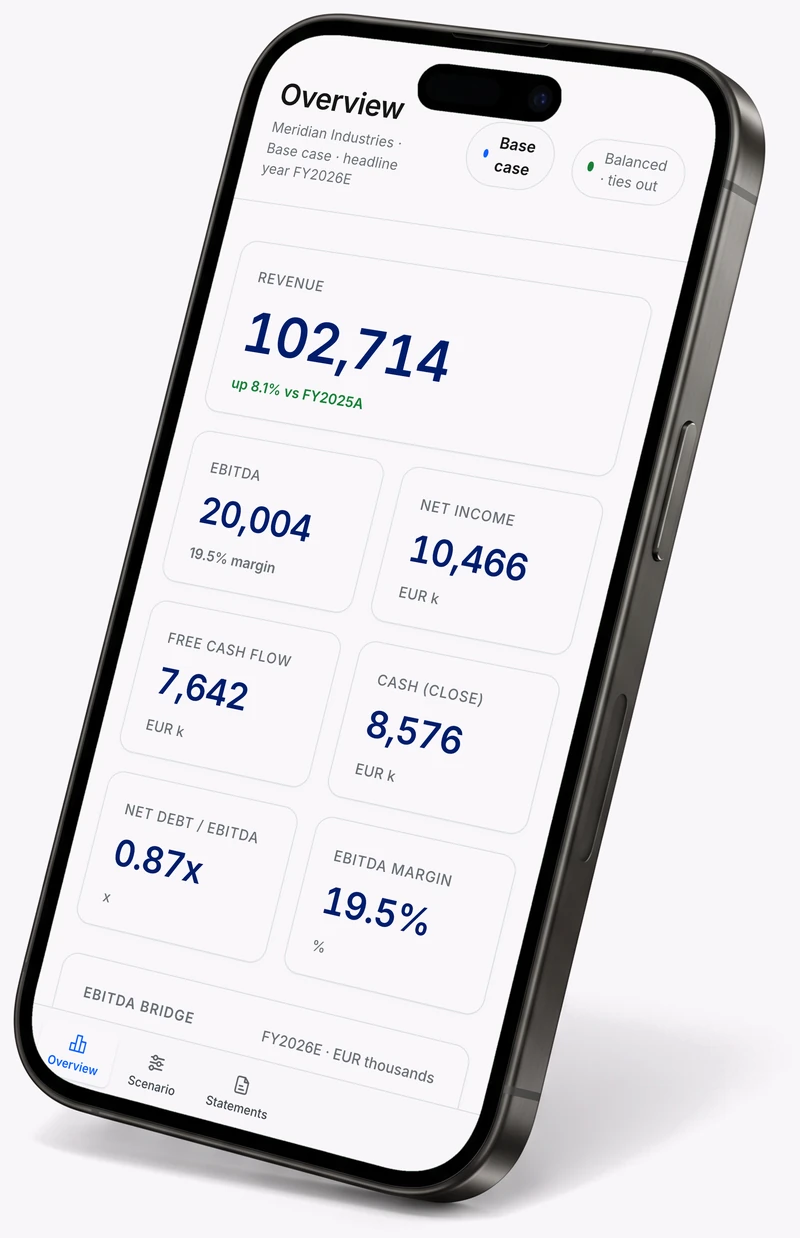

A phone tilted towards the text, showing the Meridian finance app built with Molnify: revenue of 102,714 up 8.1 percent, EBITDA 20,004 at a 19.5 percent margin, net income 10,466, free cash flow 7,642 and net debt to EBITDA of 0.87x

Mattias Hjortzberg, CEO of Molnify, outside the Molnify office in Stockholm

“Someone at your company already built the model this business runs on. They should not have to start over, or wait for a developer, to turn it into an app the whole team can use. AI can write that model for you now, and that is useful. But somebody still has to be able to open it and check what it does, and we think that somebody should be you. That is what the App Builder is for.Build with AI. Audit in Excel.”
Mattias Hjortzberg, CEO, Molnify

Start 14-day free trial Build as many apps as you want during the trial. Pay only for the ones you keep online, from 99 EUR per app per month, never per user. Two hundred people on your app costs the same as two: you always know what an app costs, and the price does not grow with your team.
Customers

What clients say

How teams turn Excel models into secure web apps, without code.
Molnify has helped us quickly go from idea to finished solution in just a few days, when previously it would have taken us weeks or months. We have now successfully developed and launched a number of apps/services around Telia, which drive both value for our users and our business. Molnify has helped us realize many of the ideas that would otherwise never leave the desk.
Ivo Kukavia
Innovation Catalyst, Telia Company
The organization itself consists of professionals and skilled communicators. The application is incredible. Imagine something akin to macro-enabled Excel apps and a pure cloud-based application solution that requires almost no programming that anyone can use. A tool that most consultants and companies should consider.
Joshua Hendrickson
Senior Manager, Comcast
We turned our Excel file used for quotes into a web app using Molnify! We feel like we’ve gone from a clunky Excel file to a state-of-the-art sales tool that’s accessible to our sellers on any device. The fact that sellers can also save quotes privately in the app is also a big advantage.
Niklas Akerö
Product Manager IT, Office Management
Read what these teams built, and why, in the customer stories
 
17,653
Apps created
15,796
Registered users
10
Years on the market

Figures as of August 2026. Molnify has been independently owned since 2016, serving some of the world’s largest companies with apps built from their own Excel files, and apps built in 2017 are still in production today. The most advanced public example is a municipal finance model reviewed by the World Bank at South Africa’s National Treasury’s request, in production since 2021. Read the INCA story, or browse all customer stories.

Two ways in

Build your way

AI is an accelerator, not a requirement.
With AI
Describe what you need
Tell the Molnify App Builder what the application should do, and it writes the spreadsheet behind it, formulas and all. Then you open that file, read the maths and keep working on it yourself.

200credits freefor new users
You are not handed a black box. You are handed a spreadsheet.
No credit card to try it, just a free Molnify account: email, password, one click in the confirmation mail.

In Excel
Build the model yourself
Work the way you always have. Build the model with the Excel formulas you already know, mark the cells using Molnify’s colour conventions, and upload the file. Molnify turns it into a working web application in minutes.
This is how most Molnify apps have been built for ten years, and it is not going anywhere.

Both paths end in the same place: a secure web app your colleagues open in a browser, backed by a spreadsheet you control.

Build it yourself

From spreadsheet model to working web application

Five steps, and you stay in the file the whole time.
1
Build or generate the model
Write the model yourself in Excel or Google Sheets, or let the App Builder generate it from a description.
2
Mark what each cell does
Colour the cells using Molnify’s conventions: green for what people type in, red for what they read out, yellow for the buttons and actions. That mark-up is the interface. The App Builder colours the cells the same way when it writes the file, so both routes end up in the same format and you can recolour any cell yourself afterwards.
3
Upload the file
Molnify reads the formulas, layout and logic, and builds the application from them.
4
Share the app
Your colleagues and customers use it in any modern browser. They never need Excel installed.
5
Edit the source when things change
Update the spreadsheet, upload it again, and everyone is on the new version at the same time.

The file is the instruction, not the engine. Molnify compiles it into an application that runs on its own, so it behaves the same way every time and thousands of people can use it at once.

If you would rather hear it than read it, the whole idea fits in forty-five seconds.

Scope

More than a spreadsheet calculator

From a small calculator to the system a department runs on.

None of this is on a roadmap. It all ships today.

Multi-user applications
Thousands of users on the same app at the same time, without version conflicts.
Databases and SQL
Read and write to SQL databases, with row-level access control.
External APIs
Connect to any service that supports HTTP requests.
PDF and Excel output
Generate reports and documents from your own templates.
Email and messaging
Send email, SMS, Slack and Teams messages as actions in the app.
File uploads
Let users attach files as part of the workflow.
Digital signatures
Sign documents inside the app through our e-signing integration.
Authentication and SSO
Email and password, Google, Microsoft and SAML, or your own login.
Your own code when you want it
JavaScript, HTML and CSS directly in the file, for the people who want that level of control.
No interface at all
Run the model headless and call it as an API, so another system gets the answer instead of a person.

In ten years we have not had to tell a customer that something could not be built. The claim has an honest boundary: if the logic fits a spreadsheet, it fits here. You do not need any of this to start, though. Most apps begin as a single model that someone needed to share.

Security

The questions your IT department will ask

Turning a shared spreadsheet into an app is the part that tightens control, not the part that loosens it. Here is what that means in practice.
Who may see which rows

Access is decided per user, down to individual rows in the data. Two people can open the same app and see different numbers.

How they sign in

Email and password, Google, Microsoft or SAML single sign-on. Or no login at all, if the app is meant to be open to anyone.

Where the data lives

Google Cloud in Western European data centres, with encrypted communication between the browser and our servers.

Who owns it

Under GDPR you are the data controller and Molnify is your processor. Your data is never used to train AI models, and you can export it if you leave.

And the file itself stops travelling. It stays on the server, your users get the interface you designed and nothing behind it, while you can still open every formula whenever you want to. If your procurement team needs the paperwork before you start, ask us and we will send it.

Use cases

What can you build with Molnify?

If it lives in a spreadsheet today, it can be an application tomorrow.
Two colleagues at a meeting table reviewing an ROI model that runs as a Molnify web app on a laptop, showing a three-year return on investment of 214 per cent

ROI and business case models

Turn a value calculation into something your customer can use themselves, with your numbers and your assumptions behind it.
An adviser and a client looking at a premium calculator built as a Molnify web app, showing a monthly premium of 1,240 kronor and the base rate, age loading and discount behind it

Insurance and risk models

Premium calculations and risk assessments where the maths has to hold up when someone reviews it line by line.
A salesperson showing a customer a quote on a tablet, built from an Excel model as a Molnify web app, with a unit price of 289 kronor and a gross margin of 34 per cent

Pricing and quotation tools

Give your sales team a quoting tool instead of a shared file. Quotes come out consistent, and a price change reaches everyone at once.
An engineer on a factory floor running a beam calculation as a Molnify web app on a rugged laptop, showing 78 per cent utilisation and a capacity check that passes

Engineering and technical calculations

Put a specialist model in the hands of the people who need the answer, without handing over the file.
A site supervisor at a residential building site completing an inspection checklist on his phone, built as a Molnify web app

Inspections and field reporting

Collect structured input from people out in the field, straight into your model.
Three colleagues reviewing an operations dashboard on a wall-mounted screen, built as a Molnify web app, showing 1,284 orders and 96 per cent on-time delivery

Internal operational systems

Planning, reporting and decision support for the team that outgrew the file but does not want to leave the logic behind.

See all use cases →

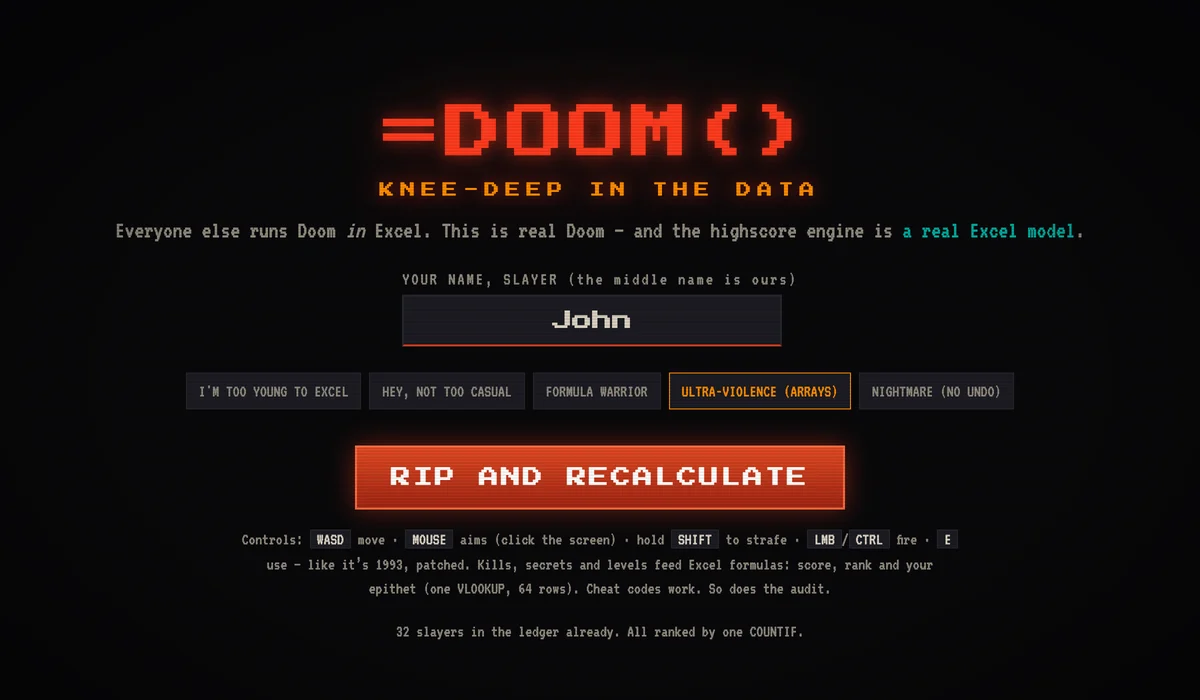
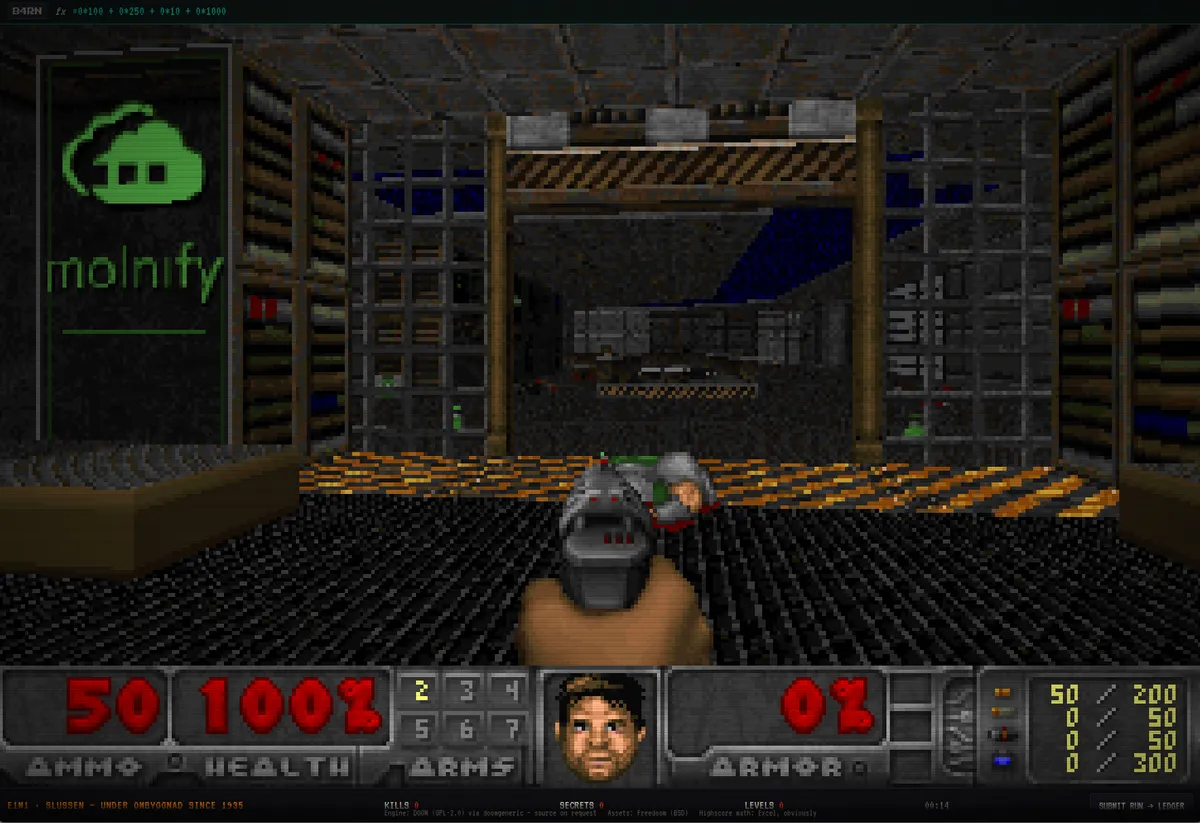
The =DOOM() start screen running as a Molnify app: the title equals DOOM open paren close paren over the line Knee-Deep in the Data, a name field holding the slayer name John, five difficulty levels from I am too young to Excel up to Nightmare with no undo, and a Rip and Recalculate buttonReal Doom running as a Molnify app: the Molnify logo lit up green on the wall of level one, the score formula in the bar at the top of the screen, and the status bar reading E1M1, Slussen, under ombyggnad since 1935

But can it run Doom?

=DOOM()

Real Doom, the 1993 kind, runs as a Molnify app. The score in the formula bar is a live Excel model, =kills*100 + secrets*250 + items*10 + levels*1000, recalculated on every kill. Difficulty runs from I’m too young to Excel up to Nightmare (no undo). Your epithet comes out of one VLOOKUP across 64 rows, the leaderboard is a COUNTIF, and when you die the screen picks one of five honest Excel errors, from #VALUE! Expected: survivor. Got: corpse. to #REF! Your reference to this life could not be resolved.

The whole game lives in that same Excel file, as JavaScript in the metadata cells, right next to the formulas that score it. One file, everything in it. You should not run your quoting process on Doom, but a platform that can run it will not struggle with your pricing model. Cheat codes work, and so does the audit.

Why build it? Mostly because we like Doom. The day job is quotes, ROI models and rate cards, and we mean it when we say we love that work: a formula someone can open and read is worth real money the day a number gets disputed. But it does leave people with a narrow idea of what a spreadsheet can hold. Almost anything, as it turns out. And whatever you build, it still arrives as one or more Excel files. That part we would not trade.

Play =DOOM() and put your name on the leaderboard. The VLOOKUP will judge you.

Engine: Doom (GPL) via doomgeneric. Assets: Freedoom. Highscore maths: Excel, obviously.

FAQ

Frequently asked questions

Thinking about creating a web application? Here are the questions we get most often.

Didn’t find your question? Ask us and a human answers.

Do I need programming skills?
No. Standard applications are built with ordinary Excel formulas and Molnify’s cell conventions. If you want more control, you can also use JavaScript, HTML, CSS, SQL and APIs, but nothing about that is required.
Can I build a Molnify app without AI?
Yes. You can build the complete application model yourself directly in Excel or Google Sheets and upload it. That is how Molnify has worked for ten years and it is still how most of our customers build. AI is an option, not a requirement.
Can the people using my app see my formulas?
No. Your users get the interface you designed and nothing behind it; the spreadsheet stays on the server and is never handed to them. You can open it whenever you like, and show it to a colleague, an auditor or your CFO if you choose to. That is the opposite of sharing the Excel file itself, where everyone with a copy gets every formula, every rate card and every assumption. For most teams, turning a shared spreadsheet into a Molnify app raises the level of control rather than lowering it.
Who is responsible for the personal data in my app?
You are. You build the app and you decide what it collects, so under GDPR you are the data controller and Molnify is your processor. The platform runs on Google Cloud in Western European data centres, and our standard agreement covers processing on your behalf, including that your data is not used to train AI models and that you can export it if you leave. If your procurement team needs the paperwork before you start, ask us and we will send it.
Does the Molnify App Builder send my data outside the EU?
That is your choice. You pick the AI model before you start, and three of the four run inside the EU: Gemini, GLM and Kimi. Only Claude runs outside it. GLM and Kimi keep almost nothing beyond a short-lived cache on the hardware doing the work, with nothing stored outside Molnify. Whichever you pick, build with made-up numbers rather than real customer records, then point the finished app at your real data once it runs on Molnify.
Does an app built with AI cost more to run?
It costs the same as any other Molnify app, and a Molnify app is a paid subscription. There are two separate costs. Building with the App Builder draws from a pool of Molnify Credits you own, and you always see your balance while you build. Everyone gets 200 free credits to start with, and a small app, like an ROI app, usually takes between 100 and 200 credits depending on complexity. Running the finished app is your Molnify plan, priced per app per month with unlimited users on every tier, whether the App Builder wrote the model or you built it by hand. New customers start with a 14-day free trial where you can build as many apps as you want; when it ends, you pay only for the apps you keep online. See plans and pricing for the current tiers.
Do Molnify Credits expire?
Never. Your credits stay yours until you use them. Per-model rates can change if our AI providers change theirs, in both directions: providers have cut prices as often as they have raised them. Changes apply from your next billing period, and we tell you by email first.
What features does Molnify offer?
Molnify supports over 200 Excel and Google Sheets functions directly within your spreadsheet. That is most of what business models use, but it is not every function Excel has, and the Molnify Reference lists exactly which ones are supported. Inputs and outputs cover text fields, charts and file uploads. Apps connect to external services and data storage, and they can generate PDF and Excel documents from your own templates.
Can Molnify be integrated with other external services?
Yes. Molnify apps talk to SQL databases, email and SMS services and external APIs, and they read and write data in Google Sheets and other data storage. Email, SMS, Slack and Teams messages are actions you place in the app, so they fire as part of the workflow rather than as a separate job. If you need a specific service, contact us and we will tell you whether it fits.
How is my data secured?
Communication between clients and our servers is encrypted. Login is by email/password, Google account, Microsoft (Entra ID) or SAML single sign-on, and row-level access control decides which rows each user may see. The platform runs on Google Cloud in Western European data centres.
Are there any limitations on the number of users or the amount of data that can be handled?
No strict limit on either. Unlimited users are included on every tier, so ten people and a thousand cost the same, and thousands of them can work in the same app at the same time without version conflicts. Data sits in SQL tables that grow with the app.
What do teams most often build with Molnify?
Pricing tools, ROI apps, data capture forms and what-if scenarios are the most common. Insurance and risk calculators, engineering calculations and field inspection apps come next. All of them are built with the Excel skills you already have, and all of them turn your spreadsheets into custom web applications.
How do I get help getting started?
There is documentation and a set of guides to start from, YouTube tutorials that walk through real builds, and support by email and phone when you would rather ask a person. Most first-week questions are about marking up the cells, and that one usually takes two minutes to answer.
What does the Molnify App Builder create?
It creates a Molnify-compatible spreadsheet model and the application structure around it, including formulas, inputs, outputs and logic. You can open that file in Excel, review the calculations and keep editing it yourself.
Can I edit an app after AI has created it?
Yes. The spreadsheet stays editable, including its formulas, inputs, outputs and logic. Change the file, upload it again, and the application updates with it.
Can I try the App Builder without my users seeing it?
Yes. Every build previews in the Lab, a private staging copy on its own address. You can build, refine and preview as much as you like, and nothing reaches your users until you press Publish.
Does Molnify support Google Sheets?
Yes. Molnify turns both Excel files and Google Sheets models into web applications, and apps can read and write Google Sheets data as part of the workflow.
Do the people using my app need Excel?
No. They open the finished application in a web browser. Nothing needs to be installed, and they never see the underlying file unless you want them to.
Is Molnify a no-code platform?
Molnify can be used without programming, and most apps are built that way. It also supports code, SQL and integrations for the cases that need them, so you are not capped by the no-code label.

See it run on your own numbers

Bring a spreadsheet you already use. We will show you what it looks like as an application, and you keep the file either way. Your first 200 Molnify Credits are free, enough to build something you can actually use. Or start with the numbers: see pricing.

Scroll to Top