

Molnify turns an Excel or Google Sheets file into a web application. That pitch is accurate, but incomplete. It’s easy to read “Excel file → web app” and assume the app inherits every constraint of the spreadsheet it came from.
It doesn’t.
The spreadsheet handles calculations. Molnify is the low-code application platform around it: user interface, authentication, a MySQL database, automations, external integrations, document generation, embedding. Almost everything you’d normally build in a web framework is already there, wired to colour-coded cells.
Does Molnify limit you to what a spreadsheet can do?
No. The spreadsheet is the calculation engine, nothing more. Formulas run the maths. Molnify renders the UI, manages users, stores data in MySQL tables, sends emails, calls external HTTP APIs, calls AI models, generates PDFs from templates, and triggers e-signing through Zigned. None of that lives in the spreadsheet.
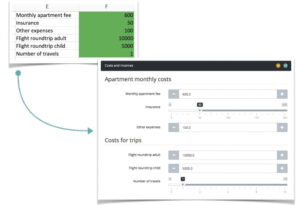
The confusion is understandable. You author a Molnify app in a spreadsheet, so the intuition is that the app is also a spreadsheet. You colour cells green, red, blue, yellow, and purple in Excel. Green means input, red means output, blue means chart or table, yellow means action, purple means metadata. That’s the authoring surface. The runtime is a full web application stack.
Spreadsheet vs. Molnify: what each layer does
| Capability | Where it runs |
|---|---|
| Formulas, calculation logic, dependency graph | Spreadsheet |
| UI rendering (inputs, outputs, charts, panels) | Molnify |
| User authentication and role management | Molnify |
| MySQL database tables with defined schema | Molnify |
| File uploads, signature capture, barcode scanning | Molnify |
| Email sending | Molnify |
| External HTTP API calls | Molnify |
| AI prompts with structured JSON responses | Molnify |
| PDF, DOCX, and XLSX report generation | Molnify |
| E-signature workflows via Zigned | Molnify |
| Scenario saving, sharing, and multi-tenancy | Molnify |
| Custom CSS, fonts, logos, favicons | Molnify |
| Custom JavaScript, DOM access, iframe embedding | Molnify |
The spreadsheet owns one layer.
Molnify owns everything else.
Rich input widgets, not just cells
A green cell in Excel is usually a number or text field. In a Molnify app, the same cell can render as:
- A slider, or a dual-handle range with custom min, max, and step
- A dropdown fed from a named range, or from a live database table
- A date or time picker
- A file upload accepting specific file types
- A signature pad
- A barcode or QR scanner, camera-driven and mobile-ready
- A multi-line textarea
- A boolean toggle button
- A read-only info panel containing arbitrary HTML
The widget is chosen by writing a short option next to the cell. None of this is a spreadsheet feature. All of it is Molnify.
Authentication, users, and permissions
A raw spreadsheet has no concept of users. Molnify does.
You can restrict an app to specific email addresses, whole domains (*@company.com), or a dynamic user list read from a database table. There are three permission tiers: regular users, managers, and superusers, each with different capabilities. Realms add multi-tenant separation, so the same app can serve several regions, departments, or customers with isolated data.
Apps can also be gated by IP range or token authentication. The logged-in user’s email, IP address, and custom tag fields are available as inputs without any extra wiring.
A database, not just cell values
Every Molnify app can have its own MySQL tables. You create them in the Data Manager, a UI on app.molnify.com where you define columns, indexes, and which apps are allowed to access each table.
That last part does a lot of work. One table can be shared by several apps. An order-entry app writes to the same customer table that a sales dashboard reads from. A quoting app, an onboarding form, and a finance report can all operate on the same rows. Suites of apps share data without anyone stitching together an external database.
From there:
- Actions persist submissions directly into tables.
- Dropdowns read their options live from tables.
- Inputs auto-fill from prior records based on a selected row.
- Reports and emails reference stored data through formulas.
- Each row is automatically tagged with the user’s email, IP, timestamp, and app ID for audit.
The spreadsheet has no concept of row-level access control, shared tables, or indexed queries. Molnify does.
Automations and integrations
A spreadsheet calculates. A Molnify app acts.
Yellow cells define actions: buttons that trigger operations when clicked, or chain together into workflows. The main types:
- Email actions send rendered HTML emails with dynamic content built from formulas.
- HTTP actions make GET, POST, or PUT calls against external APIs with auto-generated payloads, token auth, and response parsing into variables.
- AI prompt actions send a prompt to an AI model and read the response back into the app. They support structured JSON output through a response schema, plus
thinkingBudgetandmaxOutputTokenscontrols for reasoning workloads. Handy for summarising data, classifying text, extracting fields, and generating content. - Database actions insert or update rows in the app’s own tables.
- Report generation renders PDFs from HTML, Markdown, DOCX, or XLSX templates, optionally emailing the result.
- E-sign actions create a Zigned signature request from a template with optional attachments.
- Multi-step actions chain several actions behind a single button. If any step fails, the chain stops.
Actions can be conditional, hidden, or triggered on the success of other actions. None of this exists in a spreadsheet.
Reports, documents, and e-signing
Molnify ships with a document pipeline. You define a template in HTML, Markdown, DOCX, or XLSX, wire it to input and output variables, and trigger PDF generation from a button. Output files can be downloaded, emailed to recipients with tracked links, or routed into an e-signature flow through Zigned. All of it is configured through metadata, no custom code required.
Properties like paperSize, landscape, margin, waitForExpression, and includeBackground control PDF rendering. Completed documents are served from a shareable URL.

Scenarios, sharing, and real-time dashboards
Users can save their current set of inputs as a named scenario, share it privately or with named colleagues, and reload it later. Managers see everyone’s scenarios. The owner configures whether overwrites are allowed. The word “scenario” is renameable, so call it “Order”, “Quote”, “Case”, or whatever fits the domain.
For live dashboards, calcTimerSeconds recalculates the app on a fixed interval. Useful for monitoring views that pull fresh data from an HTTP endpoint every 30 seconds. Apps can be embedded as iframes and communicate with the parent page through ordinary JavaScript.
Styling, branding, and custom frontends
Every Molnify app is a themable web application. Metadata controls the top banner colour, fonts (any Google Font), logo, favicon, button colours, and output card backgrounds. A CSS metadata field accepts arbitrary CSS. JavaScript, JavaScriptAfterLoad, and JavaScriptAfterCalc hooks run custom code at the right points in the lifecycle.
For teams that want to own the entire DOM, set Headless: TRUE. Molnify’s UI disappears, and what’s served instead is a minimal bootstrap page with the calculation engine exposed through MolnifySDK. The spreadsheet still runs the maths. The frontend is yours to build.
FAQ
Yes. Emails are triggered by an email action. Subject, recipients, and HTML body can all be built from spreadsheet formulas, so every email reflects the user’s current inputs and calculated outputs.
Yes. Each app can have its own MySQL tables, created in the Data Manager. Tables can be shared across apps, so an order-entry app and a sales dashboard can operate on the same data. Tables are populated through actions and queried through dropdowns, autofill, and download-query actions.
Yes. An AI prompt action sends a text prompt to an AI model and reads the response back into the app. It supports structured JSON output through a response schema, reasoning controls like thinkingBudget, and token-pool management. Typical uses: summarising data, classifying text, extracting fields from free-text input, and generating content.
Yes. HTTP actions make GET, POST, and PUT calls to external endpoints with token auth, response parsing, and auto-generated JSON payloads. Response bodies are written back into variables so the app can react to them.
Yes. Access can be restricted to specific emails, email domains, or IP ranges. Three permission tiers and realms support multi-tenant setups. Every submission is tagged with the user’s identity.
Yes. PDFs are generated from HTML, Markdown, DOCX, or XLSX templates. Orientation, paper size, margins, and render timing are configurable. Reports can be downloaded, emailed, or fed directly into an e-signature flow.
Yes. Signature requests are created from a template with optional attachments and sent to Zigned, which handles the signing process, the signed result, and signature validation.
Yes. Apps accept arbitrary CSS and JavaScript through metadata fields. Hooks fire on load and after every calculation, and the DOM is fully accessible, including for iframe communication between embedded apps.
Yes. Apps are standard web pages and can be iframed anywhere. The embedded app can trigger recalculations in the parent and exchange data through ordinary JavaScript.
What Molnify does beyond the spreadsheet
Molnify keeps the calculation layer in the spreadsheet on purpose. Formulas are auditable, testable, and authored by the people who actually know the maths. Everything around them is a real web platform: users, database, UI, integrations, documents, branding.
If you assumed Molnify apps are limited by the spreadsheet, the short version is that they aren’t. The spreadsheet is the quiet engine. The rest is Molnify.