

Build with AI. Audit in Excel.
Free & open source: github.com/molnify/molnify-app-builder-skill
A number in one of my Molnify apps came out wrong. I had built the app with AI, just by describing it, but the logic underneath was still my own Excel file, so I opened it, found the cell, corrected the rate, and re-uploaded. Everyone using the app was instantly on the fixed version, and I never re-prompted the AI or read a line of code. That moment, opening the actual spreadsheet behind an AI-built app and just fixing it, is something almost no app builder will give you. It’s the whole reason Molnify is different.
You can build a web app from Excel with AI in minutes, without the black box. Not a prototype, not a toy. A real app that runs your spreadsheet’s own calculations and formulas, with a custom frontend, built-in PDF generation, one or more databases it reads from and writes to, JavaScript that refreshes the screen or reacts the moment someone changes an input, email actions, even a message posted straight to your team’s Slack channel, and much more.
An app your whole team can log into securely, or one you open to the public on your own web page or as a standalone site.
The kicker? All of it is created inside your spreadsheet, and you can audit that file. Know a little Excel and you can read exactly how every calculation and formula works. Why does that matter so much? Because of the part nobody mentions in the demo. With almost every other tool that builds an app for you, the moment the AI finishes you can’t read what it built. The logic vanishes into generated code, and unless you’re a developer it’s a black box you’re asked to trust. As Fortune reported in 2026, AI is accelerating how fast software gets built, but trust is becoming the bottleneck. Speed was never the hard part. Trust is.
We wrote recently about why vibe-coded business logic is so hard to audit. This post is the other half of that story: how you get the full speed of AI without ever giving up the file you can read.
So how does it actually work?
Molnify is a platform that turns an Excel file into a secure, multi-user web app and keeps the spreadsheet as the logic you can open, read, and audit. Some tools run your Excel formulas; others let you build an app by chatting with AI. We have not found another that does both, then hands you back the exact spreadsheet to open, own, and audit.
This is not new or unproven. Molnify has been turning spreadsheets into real software since 2016, more than ten years, and in that time it has been used to build over 16,000 apps for more than 15,000 users. It runs production tools for organisations like Telia, Vattenfall and If, for Lund University Hospital, and for government agencies from the Nordics to South Africa.
What’s new: build your app with an AI like Claude Code
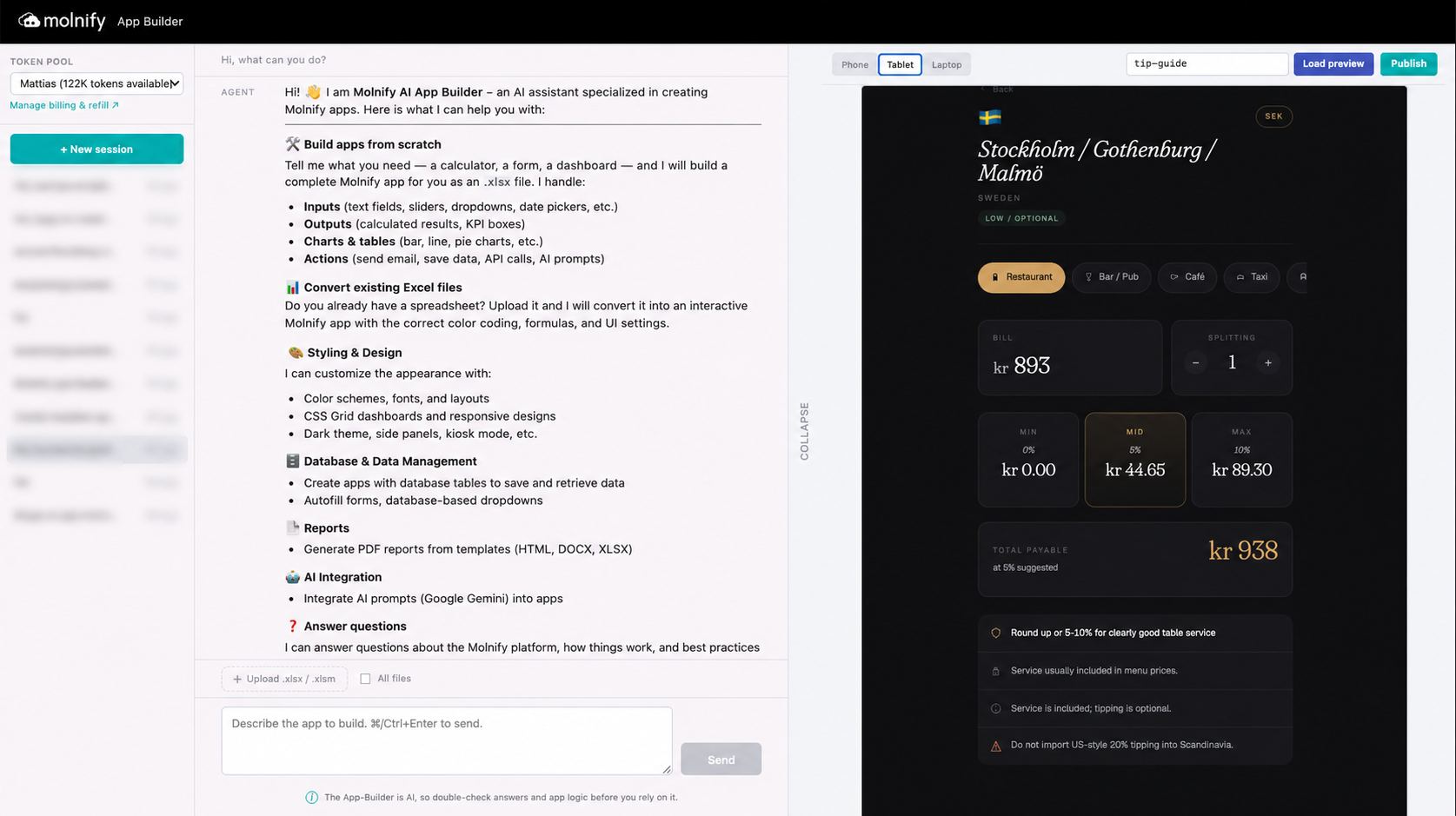
It’s simpler than it sounds. You don’t write code, and you don’t build anything inside Excel. You chat with an AI agent in plain language, the same way you’d chat with any AI assistant, and tell it what you want. That can be an agent like Claude Code, an AI assistant that runs on your own computer, with our free, open App Builder skill added, or, if a terminal isn’t your thing, our hosted App Builder, which is just a chat box on our site. Either way the agent builds the app for you on Molnify, and you get back two things at once: a live web app your team can use in the browser, and the Excel file that holds its logic, yours to open and read.
And you don’t have to use AI at all. The AI is the fast way in, but it’s optional: Molnify started as the manual route and still works exactly that way. You “Molnify” a spreadsheet yourself by adding a little structure with colour, green for the inputs people change, red for the results, blue for charts and tables, then upload it. If you’d rather see it done by hand, here’s a short walkthrough of how Molnify turns an Excel file into a web app. Whether a person or an AI builds it, the result is identical, and so is the promise: the logic stays a spreadsheet you own and can read.
Can you really build a web app from a spreadsheet with AI?
Yes. You start in one of two ways: describe the app you want from scratch, or hand over an Excel model you already use and ask the AI to build an app around it. Either way, what you get back is far more capable than a calculator with a coat of paint: a multi-user web app with inputs, calculations, charts, a database, live data from APIs, PDF output, and email. It runs in a browser, it is secure, and many people can use it at the same time, independently. It looks and behaves like real software, because it is.
What makes it different from every other AI app builder is underneath. When a spreadsheet is uploaded to Molnify, it’s read as an instruction, and Molnify uses that instruction to build the app. You can think of Excel as the programming language that Molnify compiles. The app runs, but your file is never rewritten: your formulas and equations, and everything else in the workbook, are kept exactly as you wrote them. The Excel file stays the source of truth.
The file itself isn’t running while you use the app, but it’s never locked away either. As the uploader you can download it any time, change it, and upload it again, and Molnify rebuilds the app so everyone is on the latest version automatically. Version drift, the mess of a dozen people emailing around their own copies of the same workbook, solved.
What does “vibe-coding without the black box” actually mean?
Vibe coding is the fun part of modern AI building: you describe what you want and watch it appear. The black box is the not so fun part: the logic ends up as code you didn’t write and can’t check. Molnify keeps the first and removes the second. You build by chatting, exactly like every other AI tool. But the rules that actually run your business, the pricing, the VAT, the margins, the commission, stay a spreadsheet. There’s never a moment where the thing your business depends on is hidden from you.
How is this different from Lovable, Bolt, or Glide?
It comes down to where your logic ends up living. Tools that turn a prompt into code give you generated code. To verify or change the important rules, you have to read that code. For a finance or operations team, that is a wall.
Most spreadsheet-based no-code tools treat your Excel file as a one-time data source: they read the rows, then ask you to rebuild your logic in their own editor or expression language, so a converted copy, not your workbook, becomes what actually runs. A few do run Excel formulas, which is closer to how we think, but the app still lives on their import rather than the file you keep.
Molnify works differently, and this is the part to get right. It reads your Excel as an instruction and compiles it into a real app, so yes, there is code running underneath, the same as anywhere else. The difference is that Molnify keeps your exact Excel file and treats it as the source of truth. Download it from the app whenever you like and it is precisely the workbook you last uploaded, formulas intact, down to the cell. Change a number, upload it again, and the app updates for everyone instantly while Molnify hosts the new version. The app is simply how your spreadsheet runs; the spreadsheet stays the thing you own, read, and audit. That one decision is what makes everything else possible.
| Code-generation AI (Lovable, Bolt) |
Spreadsheet-import no-code (Glide, Softr, Power Apps) |
Molnify | |
|---|---|---|---|
| Where your logic ends up | Generated code | Their rebuilt copy | Your exact Excel, kept |
| To check a rule, you | Read the code | Trust their rebuild | Open a formula |
| The source of truth is | The code | Their copy of your logic | Your Excel file |
| Who can change it | A developer | Their platform | Anyone who knows Excel |
Can I see and change what the AI built?
This is the whole point. That wrong number from the top? You can open the very app it happened in further down on this page. I had described a quoting tool, a product picker, live exchange rates from an API, charts, a branded PDF quote, every quote saved to a database, and the AI built it. When a total came out wrong, I opened the Excel model behind the app, found the VAT cell, and corrected the rate, exactly as I would in any spreadsheet. No re-prompting the AI, no ticket, no reading a line of its code; just a number fixed in a file, and everyone on the corrected version a moment later.

And the file is never locked away from you. As the app’s owner you can download the exact Excel model it runs on straight from the app, open it, and read every formula for yourself. Your end users just use the app; the model behind it stays yours to inspect, audit, and change.
And here’s what surprises people: because the logic is a readable spreadsheet, your AI can check it too. It reads the formulas back, explains them in plain language, and flags what looks off. So you get an AI that builds and validates, sitting on top of a model anyone with a little Excel can audit by hand. Two safety nets, both of them readable.
We saw this play out with a long-time customer, a marketer rather than a programmer, who had spent years building a sophisticated sales tool. When he started building with AI, the speed amazed him, but something unsettled him too: the work felt like it was slipping out of his hands, and the thing he had poured years into no longer felt like his. That feeling is the black box, described from the inside. The answer to it turned out to be almost mundane: a file. The model behind his app is a spreadsheet he can open, his own logic in plain formulas, his to change. The control he was afraid AI had taken was never really gone. It was sitting in a spreadsheet with his name on it.
Do I need to know how to code?
No. Describe what you want and the AI builds the app and the Excel logic behind it, formulas and all. Ask it to change something later and it will. The difference from a black box is that you’re never shut out: the logic is a spreadsheet, so you can change a formula yourself whenever you want, no developer required. The AI does the heavy lifting. You keep the keys.
Is the logic auditable? Can my finance team read it?
Yes, because it’s a spreadsheet. A formula isn’t a black box: it’s a readable rule anyone who knows Excel can follow, step by step, to see exactly how a number was produced. That kind of traceability is where AI-generated code struggles most, and it is why this matters for regulated and calculation-heavy work. To be exact about the audit surface: the calculations that decide your numbers are the spreadsheet you download; the wiring around them, the SQL queries, the API calls, the actions, lives in the app’s settings, also there to read and change. The logic that matters most is always the readable file. The full argument is in our companion piece on the audit problem with vibe coding.
What can you actually build?
This is where people underestimate Molnify, so let me be specific. It is not just small calculators.
- Small and fast: an ROI calculator, a pricing or commission tool, a quote configurator, an internal calculator, live and shareable the same afternoon.
- Big and serious: full systems, with apps embedded inside other apps, so a quoting tool, an order tracker, and a reporting dashboard can live as one product.
- Stored data: SQL database tables behind the app, reading and writing records.
- Connected: live data pulled from external APIs: rates, prices, inventory, anything with an endpoint.
- Active: email actions that fire on a trigger, AI-prompt actions that call a model mid-workflow, and triggers that start other actions in sequence, so one click can run a whole chain.
All of it built by describing it. All of it sitting on logic you can open and read. That combination, the power of a full platform plus a brain you own and understand, is the part we haven’t seen anywhere else.
Want proof from people who aren’t us? Our customer success stories show the problems Molnify customers have solved, and the value they’ve built for their businesses, with exactly this.
Three apps you can open right now
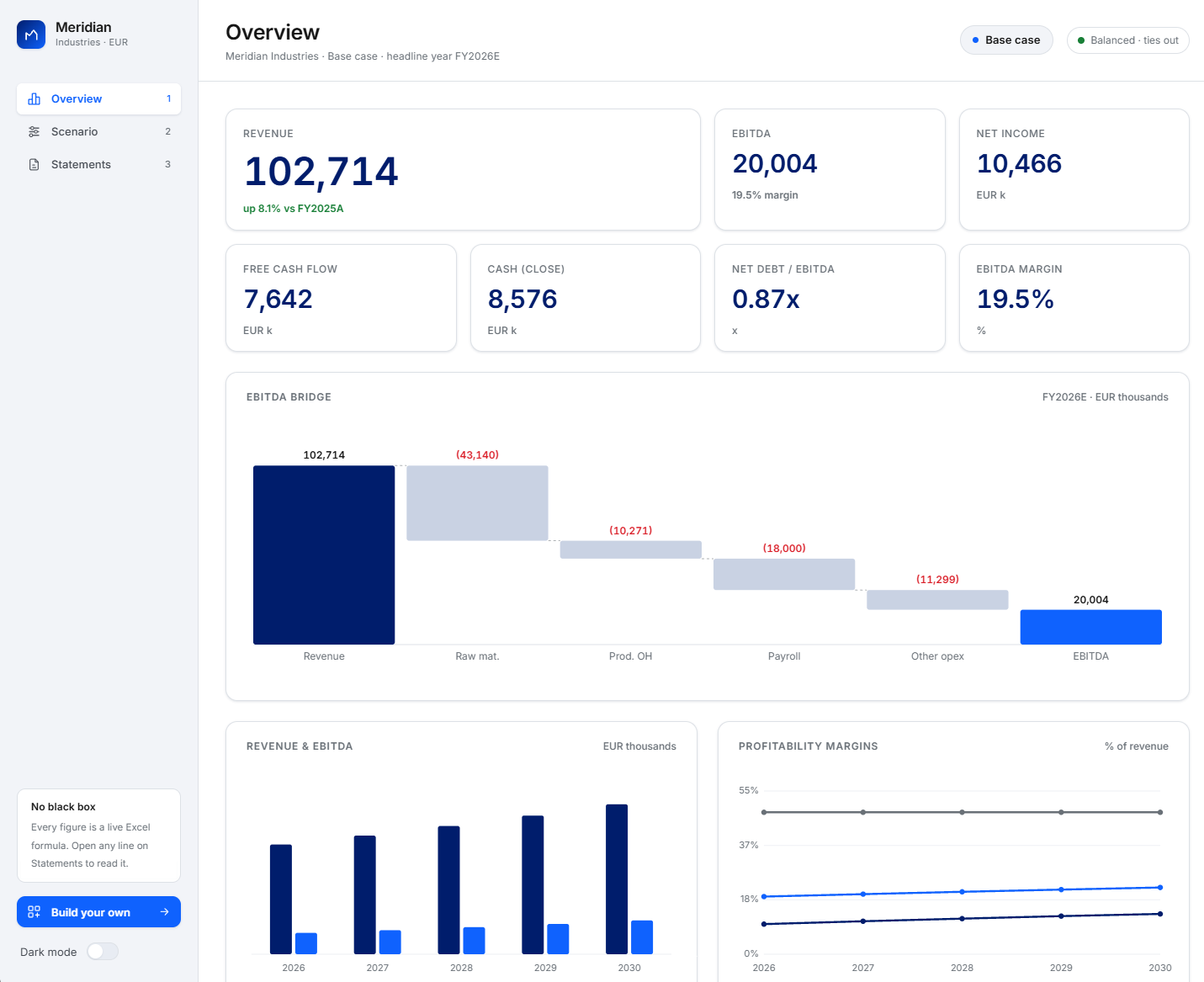
1. Meridian: a CFO-grade Excel financial model turned web app, with PDF and AI-prompt actions built in
Start with a serious one. We took a five-year plan for a manufacturer, with full statements, three scenarios, and built-in audit checks, and turned it into a polished web app just by adding a single cover sheet to the workbook. The heavy model stays exactly what it was: an Excel file you can open, audit, and download. The model is the logic Molnify compiles; the cover sheet is what turns it into an app.
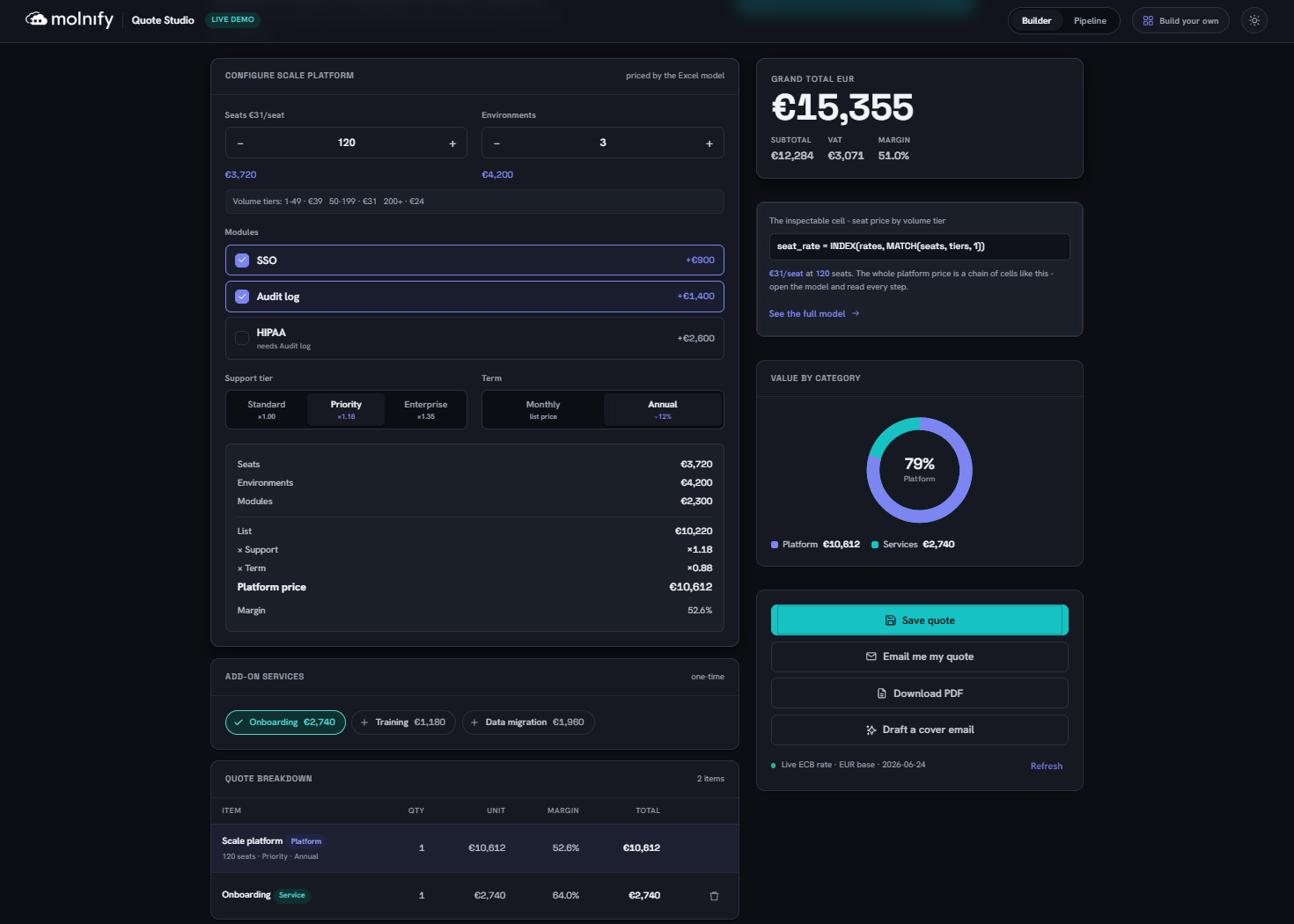
2. Quote Studio: a quoting app with complex business logic, the kind you want to be able to verify, and you can, in Excel
This one we built from a prompt rather than an existing model. It’s live and clickable, with its pricing logic in a spreadsheet you can open. Go try the Quote Studio demo. Inside it you can download the exact Excel model it runs on and read every pricing step, and one button fires a built-in AI action that drafts a tailored cover email for the quote, written from the numbers the app just produced. If you build for a sales team, the same approach carries the harder parts of quoting: option and bundle rules, volume and discount logic with approval limits, a PDF that matches your own template, and a push of the finished quote to your CRM, all of it logic you can open and read.
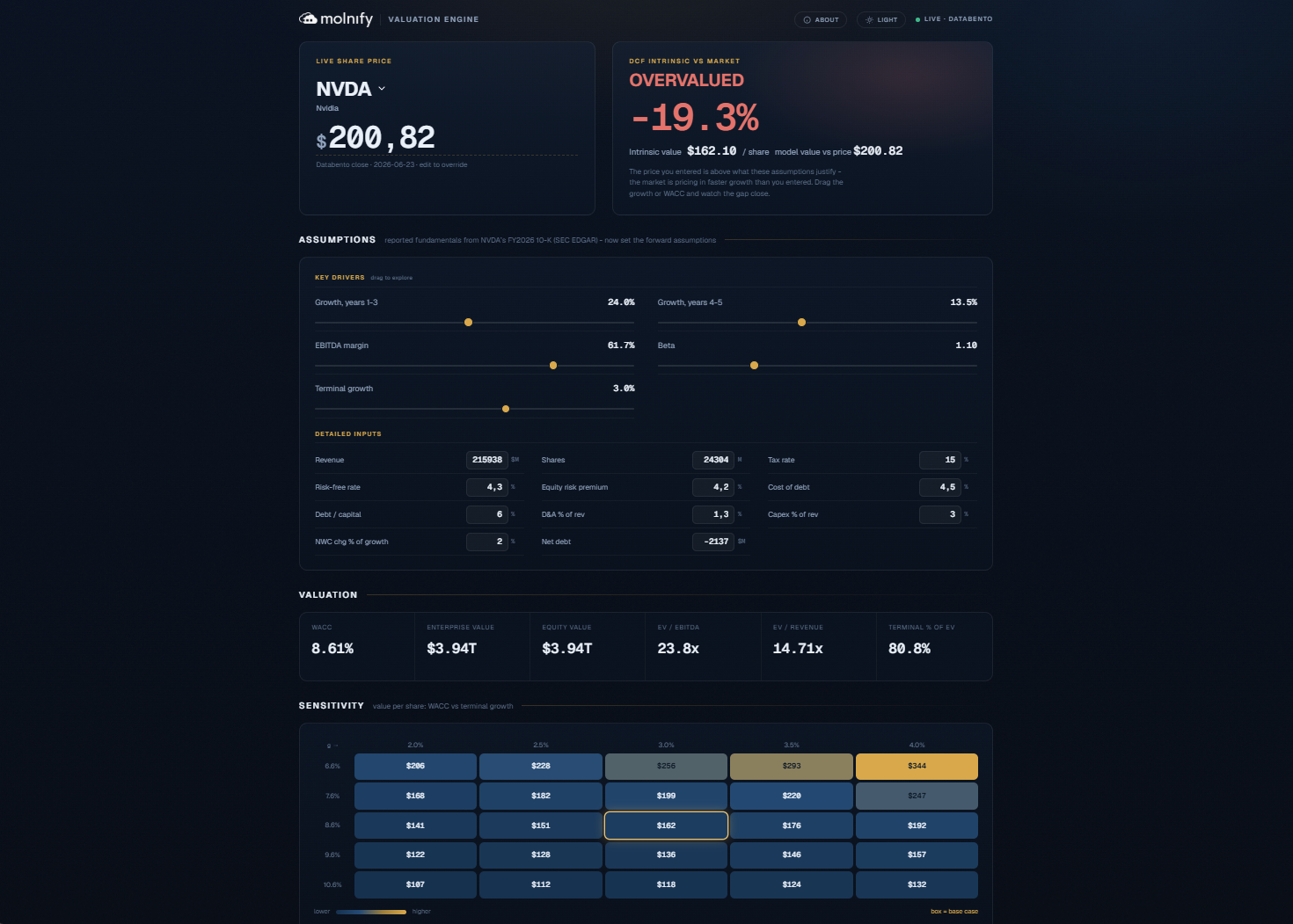
3. DCF valuation: fetches share-price data from an API and lets you simulate a company’s fair value, then flags it as over- or under-priced
This DCF valuation app was built the same way. It pulls live market data from external APIs, runs a full discounted-cash-flow model, and shows a sensitivity table and a clear verdict, with the whole model still a spreadsheet you can audit. Its valuation logic came together quickly with Claude’s finance skills, Anthropic’s toolkit for financial modelling. From inside any of these apps, the sidebar links straight to the open App Builder skill and to our GitHub, so you can read exactly how it was made.
All three apps have a link inside them so you can download the exact Excel file they were created in.
One platform, not a patchwork
There’s a quieter advantage that shows up once an app is live and in daily use. Build with some AI tools and your app slowly turns into a patchwork: one service for the database, another for sign-in, another for generating PDFs, each with its own bill, its own outage to worry about, and your data scattered across other companies’ clouds. Molnify is one platform. The database, user accounts and permissions, PDF generation, and live API calls are built in, and so are actions: AI-prompt actions that call a model mid-workflow, scheduled actions, and triggers that fire one step after another, so a single click can run a whole chain. It all sits on infrastructure we have spent more than ten years hardening, and on security that holds up to scrutiny: the IT and security teams at the enterprises and public bodies that run Molnify audit hard before anything touches their data, and Molnify has passed those reviews every time. One platform to trust, one place your data lives, one team keeping it running.
How do I get started?
Two ways in, and the first is free and open. If you already use Claude Code or another AI agent, add our open skill. It teaches your AI exactly how Molnify works, and it runs on your own subscription, so there’s no extra cost from us. We build with Claude Code and happily recommend it, but you are never locked to one AI vendor: the skill is open and works with any capable agent, so you can use the model you trust today and switch the day that changes. Run this one line in your terminal:
It’s open source and Apache-2.0 licensed. Read it on GitHub. We keep improving the skill all the time, and it updates itself, so you are always on the latest version automatically. Not in a terminal? There is also a hosted App Builder you can use right on our site, open to everyone since 8 September 2026.
What does it cost? Start with a free trial, so you can build a real app and see it work before you pay anything. After that you pay per app, per month, not per user, so a whole team can use an app without the price climbing as you add people. Most apps run comfortably on a Standard subscription; a few advanced features, like the AI-prompt action or file uploads, can change the price. We don’t list per-app numbers here, since they depend on what the app does, but you’ll find the plans on our pricing page.
Frequently asked questions
How do I stop the AI from rewriting my existing formulas?
You stay in control. Tell it to preserve your logic and it leaves the cells you trust untouched. And it works the other way too: the AI is a strong formula-writer in its own right, so when you want, it will build new Excel formulas for you, explain them in plain language, and leave them in the same spreadsheet you can open and check.
Can the app save data, or is it only a calculator?
It can save data. Apps read from and write to database tables, so you can store quotes, records, submissions, and history, not just calculate a result. They can also save named scenarios, so someone can save a whole set of inputs, a quote, a case, a what-if, and load it again later exactly as it was.
How do I update an app later without losing its saved data?
You update the app and its logic while the stored data stays put. And the model behind it lives in your Excel file, which you can download and keep on your own computer, so you always hold a full copy of the app’s logic. For bigger changes there is a Lab mode: Molnify spins up an exact copy of your app on a separate address, with its actions, SQL and databases cloned and even filled with a copy of your production data, so you can rework everything and try it against realistic data without touching the live app. When you are happy, you push to production with one button. It lives in the Molnify interface today, and since we keep improving the App Builder skill and it auto-updates for everyone, expect more tricks like this over time.
Should I use the default look, or build a custom frontend?
The default look ships instantly and is clean out of the box. When you want more, go fully custom, what we call headless, and you own the entire frontend, so the app can look like anything: a polished marketing site, a bespoke dashboard, whatever you design. With an AI agent you can lean on its design skills to make something distinctive rather than a template. We built a loan-calculator to showcase our built-in API feature, and that app reads like a product landing page with only a little Molnify underneath, while every number still comes from the spreadsheet behind it.
Is it only Excel formulas, or can I use code too?
The business logic stays Excel formulas. Molnify supports over 200 different Excel functions, in any combination and as many as you need, and you can see the full list in our reference, which is what keeps it readable and auditable. When you need more, you can extend the interface with JavaScript and shape data with SQL queries in the autofills, where you can write powerful queries. None of it hides the logic back inside a black box.
The one-line version
Build it with AI, audit it in Excel. You get the full speed of vibe coding with no black box, on a platform that businesses have relied on for more than ten years. The app is fast and modern; the logic underneath stays a spreadsheet you can open, and it stays yours no matter which AI you built it with. Speed or control was always the trade nobody wanted to make. Here you don’t have to.

By Mattias Hjortzberg, CEO of Molnify, and Maya, Molnify’s AI teammate · Updated 29 June 2026