
Excel to web app
Convert Excel to a web app. Keep every formula.
Colour-code your cells (or let AI do it), upload the file, and Molnify builds a secure, multi-user web app from your spreadsheet. Your formulas come across unchanged and give the same results as in Excel, so you never rebuild your logic or write code.
The basics
What is an Excel-to-web-app conversion?
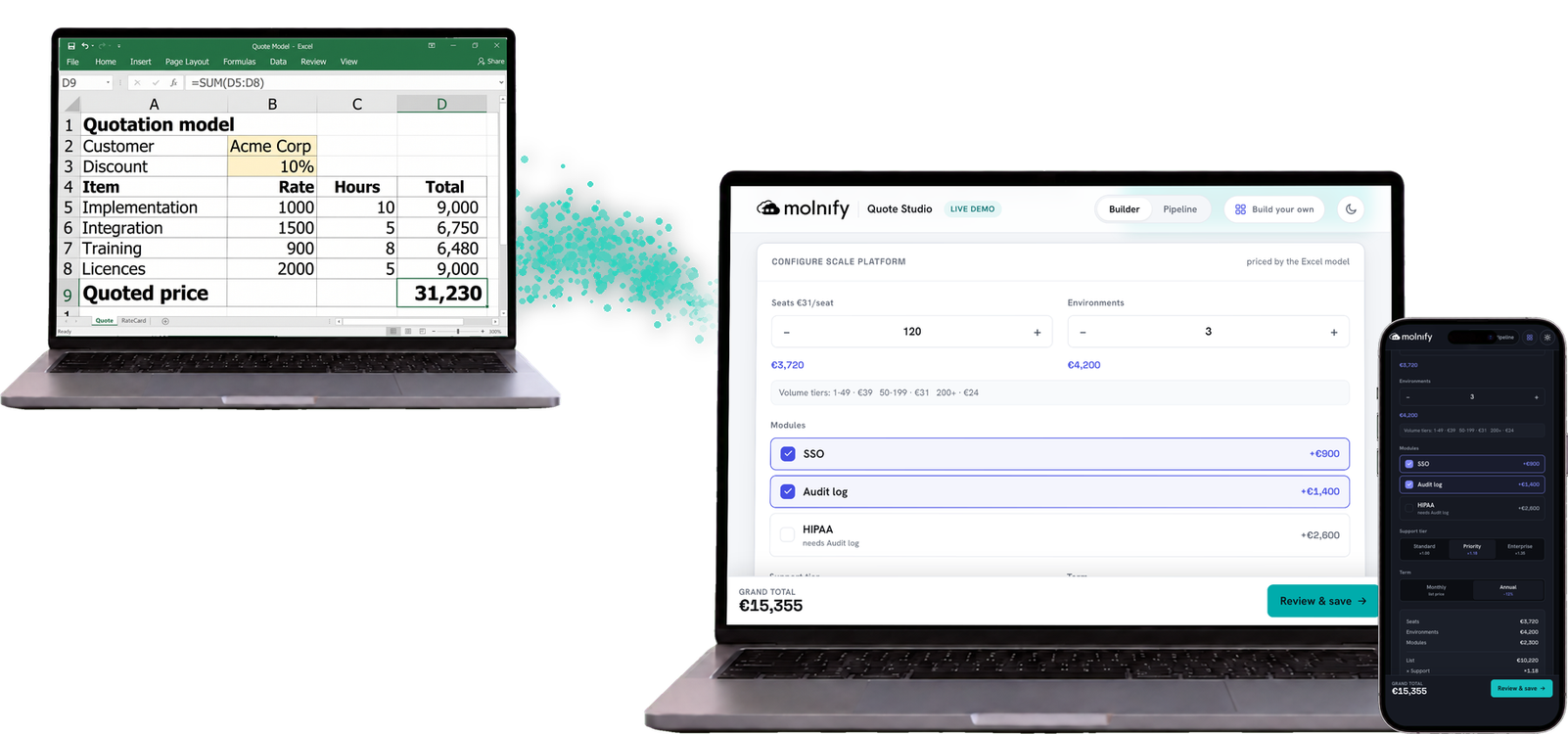
An Excel web app is a browser application built from your spreadsheet, with the same formulas doing the calculations. Instead of emailing an .xlsx file around, you share a clean interface (input fields, results, charts, buttons) driven by those formulas.
The conversion keeps the spreadsheet as the source of truth. You don’t rebuild your logic in a new tool. The formulas you already trust keep doing the maths; the web app just wraps a usable, secure front end around them and decides who can see what.
How it works
However you build it, Molnify does the rest
AI
App-builder skill
Free and open-source. Runs in your own coding agent, like Claude Code.
Your file goes in
Upload your Excel or Google Sheets file to Molnify.
Molnify builds it
Reads your formulas and generates the app in seconds.
Share it securely
Add logins and control who sees what. Re-upload the sheet to update.
Many apps go from spreadsheet to shareable link the same day. Want a hand getting started? Book a demo and we’ll help you build your first one yourself.
Ways to convert
How Molnify compares to the other ways to turn Excel into a web app
| Approach | Your formulas do the maths | Real, secure app | No rebuilt logic | Change the logic in the sheet |
|---|---|---|---|---|
| Molnify | ✓ | ✓ | ✓ | ✓ |
| Share the file (not an app: Excel Online, Google Sheets) | ✓ | ✕ | ✓ | ✓ |
| Vibe coding & no-code app builders | ✕ | ✓ | ✕ | ✕ |
| Custom development | ✕ | ✓ | ✕ | ✕ |
Sharing the raw file keeps your formulas, but it isn’t an app: everyone edits the same sheet and there’s no access control. AI and no-code app builders give you a real, secure app, but the logic gets rebuilt as code or database tables, so your spreadsheet stops being the source of truth. Custom development can do anything, given engineers and months.
Molnify is the one approach that keeps your Excel formulas doing the calculations and wraps a secure, multi-user app around them. You get the file ready by colour-coding cells so Molnify knows what each part does. You can do that by hand, with Molnify’s AI app-builder, or with our team. Your logic stays in the spreadsheet, where you can open, read and audit it, and update the app by re-uploading the file.
Beyond the spreadsheet
What Molnify adds on top of your sheet
Stays in your spreadsheet
Formulas and calculation logic
The dependency graph between cells
Your single source of truth
Logic you can already audit and test
Molnify adds around it
✓ A clean web UI (inputs, results, charts)
✓ Logins and per-user access control
✓ A database for storing submissions
✓ Email, SMS, Slack and Teams notifications
✓ PDF generation and e-signing with Zigned
✓ External APIs and AI prompts
Your formulas handle the calculations; Molnify is the application platform around them. The logic stays in the spreadsheet on purpose, and formulas are auditable and testable: you can open the sheet and see exactly how a number was reached. That’s a hard thing to keep once you rebuild your logic inside someone else’s app builder. For the full tour of the platform layer, see what Molnify adds on top of your spreadsheet.
What you can build
From calculators to quote tools
If it lives in a spreadsheet today, it can be a web app: pricing, ROI, sales quotes, configurators, data-entry forms.
Engineering calculators
Load, sizing and scenario models your team runs in the browser. The same formulas, now a controlled tool instead of a shared .xlsx that drifts out of sync.
Insurance calculators & quote tools
Premium and cost estimators that stay accurate because the pricing logic is still your spreadsheet. Update the rates, re-upload, done.
Profit margin & pricing calculators
A guided pricing tool sales can use on any device, with the margin model kept in formulas your customers never see.
“
We turned our Excel file used for quotes into a web app using Molnify! We feel like we’ve gone from a clunky Excel file to a state-of-the-art sales tool that’s accessible to our sellers on any device.
Product Manager IT, Office Management
FAQ
Common questions about converting Excel to a web app
Do I need to know how to code?
No. If you can build a spreadsheet and colour a few cells, you can build a Molnify app. There is no programming step.
Do my Excel formulas still work?
Yes. Molnify supports over 200 Excel functions natively, including VLOOKUP, IF, SUMIFS and data validation. Your formulas carry over exactly and keep doing the calculations.
Does it work with Google Sheets too?
Yes. You can upload an Excel file or connect a Google Sheet, and the same colour-coding rules apply.
How long does the conversion take?
The build itself takes seconds once your sheet is structured. The work is in colour-coding the spreadsheet first; after that, many teams go from idea to a working, shareable app the same day.
Can I update the app after it goes live?
Yes. Change the spreadsheet, re-upload it, and the app updates with it. The spreadsheet stays your source of truth.
Is it secure and multi-user?
Yes. Apps run behind secure logins with email, Google or Microsoft accounts, and you control who can access each app and what they can see.
How much does Molnify cost?
Molnify uses per-app pricing with unlimited users on every plan. See plans and pricing for the current tiers.
Turn your Excel file into a web app
Start a free trial and convert your first spreadsheet today, or book a demo and we will do the first one with you.